


In the intricate dance of modern B2B operations, the seemingly mundane act of labeling underpins the very foundations of efficiency, accuracy, and compliance. Recent industry analyses indicate that mislabeling and inefficient labeling processes can account for up to 15% of supply chain errors and significantly inflate operational costs through rework, returns, and compliance penalties. This compelling statistic underscores why selecting the right label printer is not merely a procurement task but a critical strategic decision for enterprise clients. This comprehensive guide is meticulously designed to assist businesses in navigating the complex landscape of label printers, offering a rigorous evaluation framework and actionable insights to select solutions that drive efficiency, reduce costs, and support sustained business growth. We will delve into various printer technologies, crucial selection criteria, top industry models, and strategic implementation practices to ensure your labeling infrastructure is robust, secure, and future-proof.
Key Takeaways
- Understanding your specific B2B labeling needs (volume, environment, application) is paramount for optimal selection.
- Thermal transfer printers generally offer superior durability and media versatility for enterprise applications compared to direct thermal, making them ideal for long-term labeling.
- Total Cost of Ownership (TCO), encompassing consumables, maintenance, and energy, often outweighs the initial purchase price and must be a primary consideration.
- Seamless integration with existing ERP/WMS systems is a non-negotiable for enterprise efficiency and data integrity.
- Investing in scalable and reliable hardware from reputable brands minimizes operational disruptions and ensures long-term support.
1. Defining Your Enterprise Labeling Ecosystem
An effective labeling strategy begins with a deep understanding of your operational ecosystem. Each sector within an enterprise—from manufacturing to logistics—presents unique demands for label durability, information density, and application speed.
1.1 Diverse Applications of Business Labeling
Enterprise labeling extends far beyond simple product identification, touching every facet of the supply chain and internal operations.
- Shipping & Logistics Labels (Compliance, Tracking): Critical for carrier compliance, real-time tracking, and efficient sorting. These often require high print speeds and robust scannability.
- Inventory & Warehouse Management (SKU, Barcode, Location): Essential for accurate stock control, reducing picking errors, and optimizing storage. Labels must withstand warehouse conditions.
- Asset Tracking & Management (Fixed Assets, Equipment): Durable labels for tracking high-value assets, equipment maintenance, and IT hardware, often requiring resistance to wear and tear.
- Product Identification & Packaging (Compliance, Branding): From primary product labels to secondary packaging, these labels convey critical product information, regulatory data, and brand messaging.
- Compliance & Safety Labeling (Hazmat, GHS, UL): Non-negotiable for safety and regulatory adherence, demanding highly durable, chemical-resistant labels with precise color and text requirements.
- Laboratory & Healthcare Labeling: Specialized labels resistant to chemicals, extreme temperatures, and sterilization processes, crucial for sample identification and patient safety.

1.2 Core Considerations for B2B Labeling Solutions
Before evaluating specific printer models, enterprises must establish a clear set of requirements based on their operational realities.
- Volume & Throughput: Accurately assess your daily, weekly, and peak-demand label print counts. This dictates the required print speed and duty cycle of the printer. A printer rated for 1,000 labels/day will quickly fail in an environment demanding 5,000.
- Label Durability & Environment: Consider the conditions your labels will endure. Will they be exposed to moisture, chemicals, abrasion, extreme temperatures (freezing, heat), or prolonged UV light? This directly influences the choice between direct thermal and thermal transfer, as well as specific label and ribbon materials.
- Integration Requirements: Seamless integration with existing enterprise systems is paramount. This includes ERP (e.g., SAP, Oracle), Warehouse Management Systems (WMS), Transportation Management Systems (TMS), and other custom applications. The printer must support standard communication protocols and command languages (like ZPL, EPL, TSPL) and potentially APIs or SDKs for deeper integration.
- Scalability: Can the chosen solution grow with your business? Consider future expansion plans, increased production, or diversification of labeling needs. A scalable solution avoids costly replacements down the line.
- Regulatory Compliance: Many industries have specific labeling standards (e.g., GS1 for barcodes, GHS for chemical labeling, UL for product safety). Ensure the printer and its consumables can consistently meet these stringent requirements for print quality and material specifications.
- Security: In networked printing environments, data security is a critical concern. Printers should offer features like network authentication, data encryption, and robust access controls to protect sensitive information and prevent unauthorized use.
2. Types of Label Printers for Enterprise Environments
Understanding the fundamental technologies behind label printers is crucial for making an informed decision tailored to enterprise demands.
2.1 Direct Thermal vs. Thermal Transfer: A B2B Perspective
The choice between direct thermal and thermal transfer technology is perhaps the most fundamental decision, driven primarily by label longevity and durability requirements.
- Direct Thermal:
- Mechanism: Direct thermal printers apply heat directly to a heat-sensitive label material, causing it to darken and form the image. No ribbon or ink is used.
- Advantages: Simplicity (fewer consumables, easier operation), lower initial cost per label (no ribbon cost), faster print speeds as there’s no ribbon to manage.
- Disadvantages: Labels are sensitive to heat, light, and abrasion, leading to fading and degradation over time. They are not suitable for long-term archiving or harsh environments.
- Best for: Short-term, high-turnover applications where label longevity is not critical, such as shipping labels, receipts, temporary inventory tags, and pick tickets.
- Thermal Transfer:
- Mechanism: Thermal transfer printers use a heated printhead to melt a wax, resin, or wax/resin ribbon onto the label material, creating a durable image.
- Advantages: Superior durability (resistant to chemicals, abrasion, moisture, extreme temperatures), excellent print quality and image stability, media versatility (can print on paper, polypropylene, polyester, vinyl, etc.).
- Disadvantages: Requires a ribbon, adding to consumable cost and a slight increase in operational complexity.
- Ideal for: Long-term, critical applications where durability and archival quality are essential, such as asset tags, product identification labels, compliance labels (GHS, UL), outdoor labels, and serialized inventory tracking.
| Feature | Direct Thermal | Thermal Transfer |
|---|---|---|
| Mechanism | Heat applied directly to heat-sensitive paper | Heat melts ribbon onto label material |
| Consumables | Special heat-sensitive labels | Standard labels + ribbon |
| Print Durability | Low (fades with heat, light, abrasion) | High (resistant to chemicals, abrasion, UV, temps) |
| Print Quality | Good, but can degrade | Excellent, sharp, long-lasting |
| Media Versatility | Limited (only thermal paper) | High (paper, synthetic, specialty) |
| Cost Per Label | Lower initial, higher if durability needed | Higher initial (ribbon), lower long-term |
| Best Use Cases | Shipping labels, receipts, short-term inventory | Asset tags, product labels, compliance, outdoor |
| TCO Impact | Lower upfront, potentially higher replacement | Higher upfront, lower long-term due to durability |
2.2 Specialized Label Printer Technologies
While thermal printers dominate the B2B landscape, other technologies serve specific, niche enterprise requirements.
- Inkjet Label Printers:
- Niche Applications: Primarily used for color labels, custom branding, and compliance labels (e.g., GHS chemical labels) where color coding is essential. They offer high-resolution full-color printing.
- Considerations: Print speed can be lower than thermal for high volumes, and ink costs can be significant. Water resistance varies by ink type and media. They are excellent for on-demand, variable data color labels.
- Laser Label Printers:
- Primarily for sheet labels: Best suited for printing batches of labels on standard sheet-fed label stock (e.g., Avery labels). They use toner, similar to office laser printers.
- Considerations: High volume printing of individual labels can be inefficient due to sheet feeding. Material choices are limited to those compatible with laser toner and heat.
2.3 Form Factors: Industrial, Desktop, and Mobile Printers
The physical design and capacity of a label printer are dictated by the operational environment and required throughput.
- Industrial Printers:
- High-volume, heavy-duty, robust construction designed for continuous 24/7 operation in demanding industrial environments (warehouses, factories).
- Features: Large media capacity (rolls, fan-fold), very high print speeds, advanced connectivity options, durable metal casings, and often modular designs for easy maintenance.
- Examples: Zebra ZT series, Honeywell PM series, SATO CLNX series.
- Desktop Printers:
- Mid-volume, compact, and often more aesthetically pleasing, suitable for office environments, light warehouse use, or retail back-office applications.
- Balance of performance and footprint: Offer respectable print speeds and media capacity for daily operations without requiring dedicated industrial space.
- Examples: Brother TD series, Dymo LabelWriter series, Zebra ZD series.
- Mobile Printers:
- Portability for on-the-go labeling, ideal for field service, direct store delivery, inventory checks, or cross-docking operations where labels need to be printed exactly where they’re needed.
- Considerations: Battery life, wireless connectivity (Bluetooth, Wi-Fi), ruggedness (drop-resistant, dust/water protection), and compact design are key.
- Examples: Zebra ZQ series, Honeywell RP series.
3. Critical Evaluation Criteria for B2B Label Printers
Beyond the basic technology and form factor, a detailed evaluation of specific performance metrics, integration capabilities, and long-term costs is crucial.
3.1 Performance and Reliability
These metrics directly impact operational efficiency and the quality of your labeling output.
- Print Speed & Throughput: Measured in labels per minute (LPM) or inches per second (IPS). This must align with your peak daily volume requirements to avoid bottlenecks. High-volume operations demand industrial printers with speeds exceeding 10-12 IPS.
- Print Quality & Resolution (DPI): Higher DPI (dots per inch) translates to sharper text and crisper barcodes.
- 203 DPI: Standard for shipping labels and large 1D barcodes.
- 300 DPI: Recommended for smaller text, 2D barcodes (QR codes, Data Matrix), and intricate graphics, enhancing scannability and reducing errors.
- 600 DPI: For very fine print, highly detailed graphics, or extremely small labels, often used in electronics or jewelry.
- Durability & Build Quality: For B2B, especially in manufacturing or logistics, industrial-grade components and robust construction are non-negotiable. Look for metal casings, durable print mechanisms, and a high Mean Time Between Failures (MTBF) rating.
- Media Compatibility: Ensure the printer supports the full range of label types, sizes, and ribbon materials (wax, wax/resin, resin) your applications require. This flexibility is key for diverse enterprise needs. For specific media needs, consulting a specialist like Printhead Suppliers can provide insights into compatible printheads and media.
3.2 Connectivity and Integration
A label printer is only as good as its ability to communicate with your existing IT infrastructure.
- Standard Interfaces: USB (for local connection), Ethernet (for network connectivity, essential for enterprise), Wi-Fi (for wireless network integration), and Bluetooth (for mobile printers and local device pairing) are common.
- Advanced Connectivity: Some printers offer Serial (RS-232) or Parallel ports for legacy systems, or even RFID encoding capabilities for smart label applications.
- Software & Driver Compatibility: Ensure robust driver support for various operating systems (Windows, Linux, Mac OS) and full compatibility with industry-standard ZPL (Zebra Programming Language), EPL (Eltron Programming Language), and TSPL command languages for seamless integration with label design software.
- Enterprise Integration: Look for printers that offer APIs (Application Programming Interfaces) and SDKs (Software Development Kits) for deeper, customized integration with your ERP (SAP, Oracle), WMS, and other critical business systems. This minimizes manual data entry and potential errors.
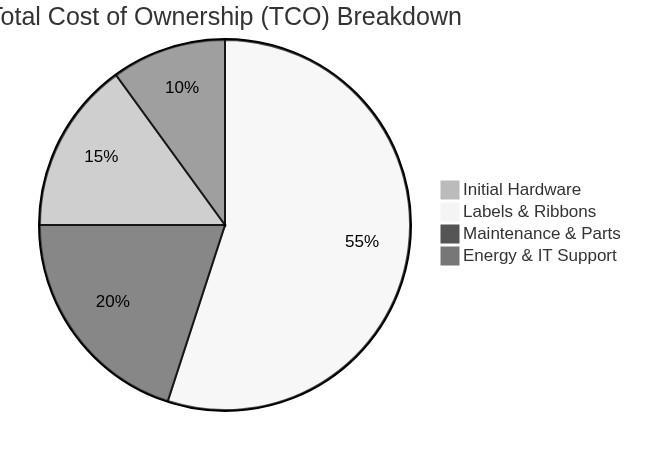
3.3 Total Cost of Ownership (TCO)
While initial purchase price is a factor, TCO is the true measure of a printer’s long-term economic impact.
- Initial Purchase Price: The upfront cost of the printer hardware.
- Consumables Cost: This is often the largest component of TCO. Calculate the cost of labels, ribbons (if thermal transfer), and replacement printheads over the printer’s projected lifespan. Bulk purchasing and vendor negotiations can significantly impact these costs. For reliable consumables, consider reputable suppliers like Printhead Suppliers.
- Maintenance & Support: Factor in warranty coverage, the availability and cost of service contracts, and the price of common replacement parts (e.g., platen rollers, printheads).
- Energy Consumption: While often overlooked, the cumulative energy usage of multiple printers over years can be significant. Look for energy-efficient models.
3.4 User Experience and Security
Beyond raw performance, how easily and securely your team can operate the printers matters.
- Ease of Use: Intuitive interfaces, clear status indicators, simple media loading mechanisms, and remote management capabilities reduce training time and operational errors.
- Security Features: In an increasingly interconnected world, printer security is paramount for enterprise networks. Look for features like:
- Network Authentication: Support for 802.1X, WPA2/WPA3.
- Data Encryption: Secure communication protocols (HTTPS, SNMPv3).
- Access Control: Role-based access, password protection.
- Firmware Updates: Regular updates to patch vulnerabilities.

“In the complex ecosystem of modern supply chains, the label printer is not just an output device; it’s a data conduit. Prioritizing robust integration and stringent security protocols is as vital as print speed for enterprise resilience.” – Industry Analyst, Supply Chain Quarterly
4. Top Label Printer Recommendations for B2B (2023-2024 Review)
Disclaimer: The following recommendations are based on recent market reviews, industry performance data, and their proven suitability for diverse B2B enterprise applications. Specific model suitability will vary based on your precise requirements.
4.1 High-Volume Industrial Workhorses
These printers are built for relentless operation in demanding environments.
- Zebra Technologies (e.g., ZT600 Series, ZT400 Series):
- Focus: Renowned for unparalleled reliability, robust integration capabilities, and high throughput. The ZT600 series offers advanced features like adaptive encoding for RFID and high-resolution printing for intricate labels, while the ZT400 series provides a solid balance of performance and value.
- Key Strengths: Durable all-metal construction, intuitive icon-based interfaces, extensive connectivity options, and ZPL command language for seamless integration.
- Honeywell (e.g., PM45 Series, PX940):
- Focus: Emphasizes precision, smart features, and ruggedness. The PM45 offers a flexible platform for industrial applications, while the PX940 stands out with its integrated label verification technology, ensuring 100% accurate, defect-free barcodes.
- Key Strengths: Advanced management tools, direct host protocol support, and high-precision printing for critical applications.
- SATO (e.g., CL4NX Plus, CL6NX Plus):
- Focus: Highlights versatility, ease of use, and robust build quality. The NX series is designed for global deployment, supporting multiple languages and printer emulations.
- Key Strengths: Tool-less maintenance, intuitive color display, and a wide array of connectivity options, making them adaptable to various enterprise setups.
4.2 Mid-Volume Desktop Solutions
Ideal for less intense environments where space and ease of use are priorities.
- Brother (e.g., TD Series, QL Series):
- Focus: Offers compact design, ease of integration, and diverse applications for office and light industrial use. The TD series provides robust thermal transfer options, while the QL series excels in direct thermal for quick, temporary labels.
- Key Strengths: User-friendly interfaces, good value proposition, and reliable performance for daily tasks.
- Dymo (e.g., LabelWriter 550 Series, XTL Series):
- Focus: Emphasizes simplicity for office and light industrial use. The LabelWriter series is popular for its direct thermal convenience, while the XTL series provides more robust and specialized labels for industrial identification.
- Key Strengths: Plug-and-play functionality, integrated software, and cost-effectiveness for moderate volume.
- Epson (e.g., ColorWorks Series):
- Focus: Specializes in color printing capabilities for specialized needs, such as GHS compliance labels or branded product labels.
- Key Strengths: High-resolution color output, on-demand printing, and durable pigment inks for water and chemical resistance.
4.3 Specialized and Mobile Solutions
For portability and specific field applications.
- Zebra Technologies (e.g., ZQ Series, ZQ600 Plus):
- Focus: Leaders in ruggedness, extended battery life, and seamless wireless connectivity for mobile printing. The ZQ600 Plus series offers advanced features for retail and transportation.
- Key Strengths: Durable design, fast printing, and robust security features for mobile data.
- Honeywell (e.g., RP Series):
- Focus: Emphasizes field-ready design and robust performance in harsh mobile environments. The RP series is built to withstand drops, dust, and moisture.
- Key Strengths: Long-lasting battery, fast print speeds, and broad media compatibility for various mobile applications.

5. Strategic Implementation and Optimization
Acquiring the right label printer is just the first step. Strategic implementation and ongoing optimization are critical for maximizing your investment.
5.1 Integrating Label Printers into Your Workflow
A structured approach to deployment ensures smooth operation and minimizes disruption.
- Pre-Implementation Checklist:
- Site Survey: Assess physical locations, power availability, and environmental conditions.
- Network Assessment: Verify network infrastructure, IP addressing, and security protocols.
- Software Compatibility: Confirm drivers and label design software are compatible with your OS and existing enterprise applications.
- Driver & Software Installation: Follow best practices for enterprise deployments, often involving centralized management tools and standardized configurations to ensure consistency across multiple devices.
- Testing & Calibration: Thorough testing is essential. Print various label types, sizes, and barcode formats. Calibrate sensors and printhead settings to ensure accuracy, consistent print quality, and reliable scannability across all applications.
5.2 Consumables Management and Best Practices
Efficient management of consumables directly impacts TCO and operational uptime.
-
Sourcing Strategy: Develop a strategy for bulk purchasing to leverage economies of scale. Establish strong vendor relationships with reputable suppliers to ensure consistent quality and timely delivery of labels, ribbons, and replacement printheads. Implement quality control checks for incoming consumables.
-
Inventory Management: Implement robust inventory practices to prevent stockouts while avoiding excessive overstocking. Optimize storage conditions (temperature, humidity) to preserve the integrity of heat-sensitive labels and ribbons.
-
Printhead Maintenance: The printhead is the most critical and often most expensive consumable.
- Regular Cleaning: Implement a schedule for cleaning printheads with approved solutions to prevent residue buildup.
- Replacement Schedules: Monitor print quality for degradation and plan for timely printhead replacement to avoid costly downtime and poor label quality.
- Impact on Lifespan: Proper maintenance significantly extends printhead lifespan and maintains optimal print quality.
5.3 Troubleshooting Common B2B Label Printer Issues
Proactive troubleshooting and maintenance are key to minimizing downtime.
- Common Issues: Print quality degradation (streaks, voids), connectivity problems (network, USB), media jams, and various error codes.
- Proactive Maintenance: Regular cleaning of printheads and platen rollers, timely firmware updates, and adherence to manufacturer guidelines are crucial. Maintain a stock of essential spare parts, especially printheads.
6. Industry Trends and Future Outlook in B2B Labeling
The labeling landscape is continually evolving, driven by technological advancements and shifting business demands.
6.1 Automation and Industry 4.0 Integration
The future of B2B labeling is deeply intertwined with broader automation and digital transformation initiatives.
- Robotics Integration for Automated Labeling: Automated Guided Vehicles (AGVs) and robotic arms are increasingly being deployed to apply labels in high-volume, repetitive tasks, significantly boosting speed and accuracy.
- IoT-enabled Printers for Remote Monitoring and Predictive Maintenance: Printers equipped with IoT sensors can transmit real-time data on performance, consumable levels, and potential issues, enabling remote monitoring, proactive maintenance, and reduced downtime.
6.2 Sustainability in Label Printing
Environmental responsibility is becoming a core consideration for enterprises.
- Eco-friendly Label Materials and Ribbons: Demand for recyclable, biodegradable, or compostable label materials and ribbons is growing.
- Energy-efficient Printer Designs: Manufacturers are developing printers that consume less power during operation and in standby modes.
- Waste Reduction Strategies: Optimizing label layouts to reduce material waste and implementing recycling programs for used ribbons and backings.
6.3 Smart Labels and Enhanced Tracking
The evolution of labels beyond mere visual information is set to revolutionize tracking and supply chain transparency.
- RFID and NFC Label Printing: Printers with integrated RFID encoders enable the creation of “smart labels” for advanced inventory tracking, asset management, and supply chain visibility, offering faster scanning and greater data capacity than traditional barcodes.
- Integration with Blockchain for Supply Chain Transparency: Smart labels, particularly those with embedded RFID/NFC, can be linked to blockchain ledgers, providing an immutable record of a product’s journey from origin to consumer, enhancing traceability and combating counterfeiting.
Conclusion/Summary
Selecting the best label printer for your enterprise is a strategic decision that profoundly impacts operational efficiency, cost-effectiveness, and regulatory compliance. By thoroughly evaluating your specific business needs, understanding the nuances of different printer technologies (especially direct thermal vs. thermal transfer), and applying a rigorous set of evaluation criteria encompassing performance, integration, and TCO, you can make an informed investment. Prioritizing total cost of ownership, seamless integration with your existing ERP/WMS, and long-term reliability will ensure your labeling infrastructure is not just a tool, but a competitive advantage that supports your business’s growth and resilience in a dynamic B2B landscape. Investing wisely in a robust, scalable, and secure labeling solution is an investment in your entire supply chain’s future.
Frequently Asked Questions (FAQ)
Q1: What is the typical lifespan of an industrial label printer in a B2B environment?
A1: Industrial label printers are engineered for heavy-duty, continuous use and can typically last 5-10 years or even longer with proper routine maintenance, consistent printhead replacement, and adherence to operational guidelines. Factors like print volume, operating environment, and the quality of consumables used significantly influence their longevity.
Q2: How crucial is DPI for standard shipping labels and barcodes?
A2: For standard shipping labels that primarily feature large text and 1D barcodes (e.g., UPC, Code 39), 203 DPI (dots per inch) is often sufficient and cost-effective. However, for applications involving smaller 2D barcodes (like QR codes or Data Matrix), intricate graphics, very small font sizes, or specific regulatory compliance labels, 300 DPI or 600 DPI printers offer superior clarity, improved scannability, and significantly reduce the risk of read errors, which can be critical for efficiency.
Q3: Can I use third-party labels and ribbons with enterprise label printers?
A3: While many enterprise printers can technically operate with third-party consumables, it is generally recommended to use manufacturer-approved or high-quality, reputable third-party options. Using unsuitable or low-quality consumables can lead to several issues, including voiding printer warranties, causing premature printhead wear or damage, resulting in poor print quality (fading, streaks), and leading to frequent printer malfunctions or media jams. Always verify compatibility and test thoroughly.
Q4: What are the key security concerns for network-connected label printers in an enterprise setting?
A4: Key security concerns for networked label printers in an enterprise environment include:
- Unauthorized Access: Preventing unauthorized users from printing sensitive labels or reconfiguring printer settings.
- Data Breaches: Protecting any sensitive data that might be temporarily stored on the printer (e.g., print job data, network credentials).
- Network Vulnerabilities: Ensuring the printer doesn’t become an entry point for cyberattacks on the broader enterprise network.
Enterprise-grade printers mitigate these risks through features like network authentication (e.g., 802.1X), data encryption (e.g., HTTPS, SNMPv3), role-based access control, and regular firmware updates to patch security vulnerabilities.
Q5: How do I accurately calculate the Total Cost of Ownership (TCO) for a label printer?
A5: An accurate TCO calculation for a label printer involves several components beyond the initial purchase price:
- Initial Hardware Cost: The upfront price of the printer itself.
- Consumables Cost: This is typically the largest component. Estimate your annual usage of labels, ribbons (if applicable), and replacement printheads over the printer’s projected lifespan.
- Maintenance & Support: Include the cost of extended warranties, service contracts, and anticipated replacement parts (e.g., platen rollers, belts).
- Energy Consumption: Calculate the electricity cost based on the printer’s power usage and your operational hours.
- IT Integration & Support Costs: Factor in any labor or software costs for integrating the printer with your existing ERP/WMS and ongoing IT support.
By compiling these costs, you gain a comprehensive understanding of the printer’s true economic impact over its operational life.


